Next.js use cache Reused the Same Cache Entry for Different Files Before 16.4.5
The Next.js docs tell you that the serializable arguments you pass to a use cache function become...
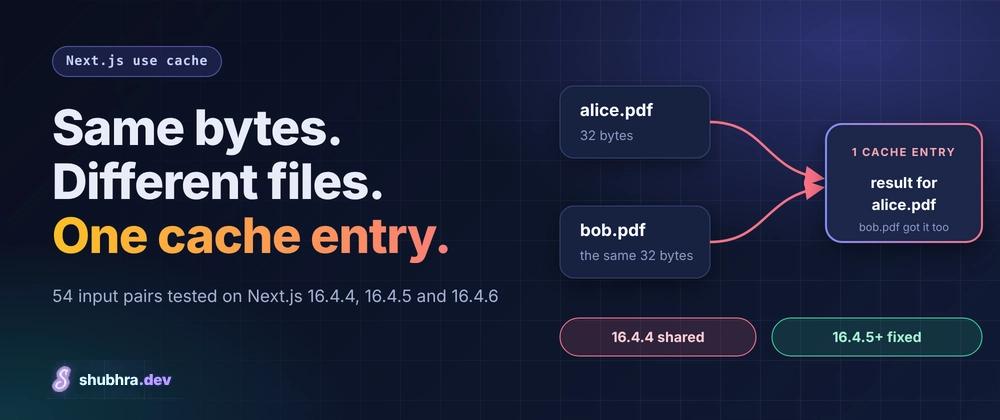
The Next.js docs tell you that the serializable arguments you pass to a use cache function become part of its cache key. They even list which types are supported. What they don't show is how binary values end up in that key, or what quietly falls out of it. That gap matters, because a cache key is a promise. Two calls with the same key get the same answer, and if the key is missing something, one caller can end up with another caller's result.
So I stopped guessing and tested it. I ran 54 pairs of different inputs through use cache on Next.js 16.4.4, 16.4.5 and 16.4.6, then opened the code that builds the key to find out why the results looked the way they did. Some of it surprised me. Two File objects with the same bytes but different names got the same cache entry. So did a byte array with an odd number of bytes and the same array with one extra zero byte on the end. It lines up with a security advisory Next.js published with the 16.4.5 fix, GHSA-rhh4-g77r-r9qj, and I'll get to that below.
I ran the tests with
next start, the default in-memory cache handler andcacheComponentsset to true, calling cached functions from route handlers and one Server Action page. The demo reproduces with one command (npm run demo) and the rest of the lab takes a few more. The code is in nextjs-use-cache-key-lab.
The short version
If you only have a minute, this is what I found.
- Most inputs behave the way you'd hope. On 16.4.6, 46 of my 54 pairs of different inputs got their own cache entry.
- Until 16.4.5, two different binary values could share one cache entry. The key ignored a
File's name and type. It treated aBloband aFilewith the same bytes as one value. It also treated a byte array with an odd number of bytes as identical to that array plus one trailing zero byte. 16.4.5 fixed all of that. File.lastModifiedstill isn't part of the key, and the source says that's on purpose. For a form upload it's only the time your server parsed the request.- Values the cache can't read (class instances, functions, RegExp, Symbols) share one entry when your function ignores them, and throw when a closure captures them.
- A
Uint8ArrayorBlobargument over about 250,000 bytes throwsRangeError: Maximum call stack size exceeded, and the exact threshold depends on your machine. I found the line of code behind it, and it reproduces in plain Node.
What goes into a Next.js use cache key
The docs list the parts of a use cache key. There's the build ID (or your deploymentId if you've set one, which overrides it), a function ID, the serializable arguments you pass, and in development an HMR hash. Variables your function captures from an outer scope are bound as arguments too, so they count as well. If you're new to all of this, my Next.js 16 Cache Components migration guide covers the basics, and the official use cache docs are the reference.
The build ID and the function ID aren't interesting. They're the same for every call of the same function in the same build. The arguments are where the surprises live, so that's what I tested.
How I tested the use cache key
The idea is simple. For each case I build two values that differ in exactly one way. Then I call the same cached function with value A, with A again (a control, to prove the call really is cached), and finally with value B. The function returns a fresh marker every time it actually runs. In my harness that's a random token, and in the short examples below it's a timestamp. If B gets A's marker back, B reused A's cache entry.
Sharing an entry isn't always a problem, though. I also compute what B should have seen without any cache. That separates a harmless alias from a wrong answer.
| Status | Meaning | | ------------ | ------------------------------------------------------------------------- | | SEPARATE | B got its own entry | | SHARED | B reused A's entry, and the output is what B would have produced anyway | | SHARED-WRONG | B reused A's entry and received output computed for a different input |
I ran this on three versions on my machine, 16.4.4, 16.4.5 and 16.4.6. Across those three the results change at exactly one boundary, between 16.4.4 and 16.4.5. If turning on cacheComponents breaks your own build before you can even test this, I wrote up the errors I hit in Every Way I Could Break Next.js Cache Components.
The repo also holds reference results for 12 versions (16.0.0 to 16.4.6, plus Node 20 and 24 for two of them). They come from a second machine, not mine. In those, the key results are identical on every version up to 16.4.4, and identical on 16.4.5 and 16.4.6. I didn't run the other versions myself, so I treat that as supporting data and not as part of my own test.
The results
Read the bold rows first.
| What differs between A and B | 16.4.4 | 16.4.5 and 16.4.6 |
| ------------------------------------------------------------------------------------------------------------------------------ | ----------------- | ----------------- |
| Strings, numbers, booleans, BigInt, null vs undefined, 0 vs -0, '1' vs 1, undefined vs the string '$undefined' | SEPARATE | SEPARATE |
| Object values, nested values, [1,2] vs [2,1], an array vs an object with numeric keys, {} vs [] | SEPARATE | SEPARATE |
| Object key order swapped ({a, b} vs {b, a}) | SEPARATE | SEPARATE |
| Map, Set and FormData insertion order swapped | SEPARATE | SEPARATE |
| Date, Map and Set values, FormData, URL, URLSearchParams | SEPARATE | SEPARATE |
| Typed arrays with different bytes, only the last byte of 200,000, Uint8 vs Int8, Uint8 vs ArrayBuffer, Uint8 vs Buffer | SEPARATE | SEPARATE |
| Blob or File with different bytes, only the last byte of 200,000 | SEPARATE | SEPARATE |
| Array hole [1,,3] vs [1, undefined, 3] | SHARED (harmless) | SHARED (harmless) |
| Same 4 bytes as a standalone array vs a view into a bigger buffer | SHARED (harmless) | SHARED (harmless) |
| File name differs (same bytes) | SHARED-WRONG | SEPARATE |
| Blob or File type differs (same bytes) | SHARED-WRONG | SEPARATE |
| Blob vs File (same bytes) | SHARED-WRONG | SEPARATE |
| Odd-length binary value vs the same value plus one trailing 0 byte (Uint8Array, Blob, File) | SHARED-WRONG | SEPARATE |
| File.lastModified differs | SHARED-WRONG | SHARED-WRONG |
| Class instance, function, RegExp or Symbol that the function ignores | SHARED | SHARED |
The totals are 38 SEPARATE, 7 SHARED and 9 SHARED-WRONG on 16.4.4, and 46 SEPARATE, 7 SHARED and 1 SHARED-WRONG on 16.4.6. The full 54-row table is in the repo.
Bob gets Alice's file
The easiest way to see the problem is a tiny cached function that takes a File.
// lib/inspect.js
"use cache";

export async function inspectUpload(file) {
  return {
    name: file.name,
    type: file.type,
    size: file.size,
    filledAt: Date.now(),
  };
}
I call it with two Files that hold the same 32 bytes but have different names. This is real output from my run on 16.4.4.
inspectUpload(File "alice.pdf") -> { "name": "alice.pdf", ... "filledAt": 1794584074839 }
inspectUpload(File "bob.pdf")   -> { "name": "alice.pdf", ... "filledAt": 1794584074839 }
Look at the second line. Bob's call got Alice's result. The filledAt value is identical, so the function body never even ran. On 16.4.5, Bob gets bob.pdf, as you would expect.
The byte-level case is stranger. Take this function.
export async function describeBytes(bytes) {
  return {
    length: bytes.length,
    last: bytes[bytes.length - 1],
    filledAt: Date.now(),
  };
}
On 16.4.4, describeBytes(Uint8Array.from([61, 62, 63])) returns length: 3, which is correct. Then I call describeBytes(Uint8Array.from([61, 62, 63, 0])), a different array with four bytes. It also returns length: 3. On 16.4.5 it returns length: 4.
One caveat before I go on. The docs list TypedArrays and ArrayBuffers as supported arguments, but they don't mention Blob or File. So what I report for those two is observed behaviour in the versions I tested, not a documented guarantee.
One extra zero byte, and the cache couldn't tell the difference.
Does the use cache File bug happen through a real form upload?
Everything above calls the cached function from a route handler. In a real app a File usually arrives through a Server Action, so I tested that path too. It's a plain <form action={upload}>, where the action takes formData.get('file') and passes it to the same cached inspectUpload. I posted the form the way a browser without JavaScript would. I wrote about other Server Action problems in Next.js 16 Server Actions and the bugs that only show up in production.
The result was the same. On 16.4.4 the bob.pdf upload returned alice.pdf's result, and a 4-byte file returned the result for the 3-byte file before it. On 16.4.5 each upload got its own result. Inside the action the value was a real File. You can run it with npm run action.
Why this happens
The code that builds the key lives in Next's server bundle, not in your code. Your arguments go through React's reply encoder first. When one of them holds binary data, the result is a FormData, and a function called encodeFormData turns that into the string used in the key. You can read it in node_modules/next/dist/server/use-cache/use-cache-wrapper.js in all three versions I tested, and my diagnose script also prints the minified copy from the build output. What follows is a simplified, renamed copy of the binary branch of encodeFormData as it was in 16.4.4, the last version before the fix. It's not a drop-in copy of Next's key builder. The diagnose output in the repo's reference results shows the same fields missing from the key in every build from 16.0.0 to 16.4.4, but I didn't run those versions myself.
async function encodeFormData(formData) {
  let key = "";
  for (const [field, value] of formData) {
    let text;
    key += field.length.toString(16) + ":" + field;
    if (typeof value === "string") {
      text = value;
    } else {
      const buf = await value.arrayBuffer();
      text =
        buf.byteLength % 2 === 0
          ? String.fromCodePoint(...new Uint16Array(buf))
          : String.fromCodePoint(
              ...new Uint16Array(buf, 0, (buf.byteLength - 1) / 2),
            ) +
            String.fromCodePoint(new Uint8Array(buf, buf.byteLength - 1, 1)[0]);
    }
    key += text.length.toString(16) + ":" + text;
  }
  return key;
}
Here's what that means. The bytes become a string, two bytes at a time, and that's all that goes into the key for that argument. There's no name, no type, and no record of whether it was a Blob or a File. On top of that, an odd number of bytes ends with a lone byte, which gets read as one code unit. On a little-endian CPU (x86 and, in practice, ARM) that's the same code unit you get from reading [x, 0] as a 16-bit number. So [61, 62, 63] and [61, 62, 63, 0] produce the same string with the same length. Replaying the logic shows that even-length arrays don't collide this way. Adding a zero byte to an even-length array makes it odd-length, and an odd-length array gets its lone byte appended as an extra code unit, so the two strings differ. My lab tests the 3-byte and 4-byte case, so the even-length part comes from reading the code and not from a run.
From 16.4.5 the binary branch also writes the name, the type and the byte length before the text.
key +=
  "B" +
  value.name.length.toString(16) +
  ":" +
  value.name +
  value.type.length.toString(16) +
  ":" +
  value.type +
  buf.byteLength.toString(16) +
  ":" +
  text;
Reading minified code is one thing, but I also wanted to see the real keys, so I wrote a small cache handler that wraps Next's default one and logs every key it receives. This is output from my run. The hex ids differ per build, so compare the two lines inside one version.
16.4.4  alice.pdf  1:110:܇܇܇܇܇܇܇܇܇܇܇܇܇܇܇܇1:050:["c084f7f0…",["$B1"],["VTD4as…"]]   miss
16.4.4  bob.pdf    1:110:܇܇܇܇܇܇܇܇܇܇܇܇܇܇܇܇1:050:["c084f7f0…",["$B1"],["VTD4as…"]]   HIT, same string

16.4.5  alice.pdf  1:1B9:alice.pdf0:20:܇܇܇܇܇܇܇܇܇܇܇܇܇܇܇܇1:050:["c02d82da…",["$B1"],["noVPW1…"]]
16.4.5  bob.pdf    1:1B7:bob.pdf0:20:܇܇܇܇܇܇܇܇܇܇܇܇܇܇܇܇1:050:["c02d82da…",["$B1"],["noVPW1…"]]
The odd character is U+0707. My 32 bytes, each with the value 7, are read two at a time as sixteen 16-bit code units. On 16.4.4 the two keys are the same string, so the second call is a hit. On 16.4.5 the file name is in the key. The same experiment for [61,62,63] and [61,62,63,0] shows 0:3: against 0:4: on 16.4.5, which is the byte length that 16.4.4 left out. You can run it yourself with npm run keys.
That one change explains every row that flipped. It also explains why lastModified didn't flip, because it isn't in that line. You can print this function from your own build with npm run diagnose, so you don't have to take my word for it.
Is this the use cache cross-user cache disclosure advisory?
It matches. Next.js's November 3 security release lists Cross-user cache disclosure and poisoning through binary use cache arguments. The GitHub advisory for it (GHSA-rhh4-g77r-r9qj, CVE-2026-119349) is rated Moderate there, while the release post says Medium. It lists 16.0.0 through 16.4.4 as affected and 16.4.5 as the fix. It says that applications passing binary arguments "(such as Uint8Array or Blob values)" to use cache functions "can produce identical cache keys for distinct arguments".
My results line up with that. On 16.4.4 I got identical key strings for different File and Uint8Array values, and shared results for Blob values too (I didn't print the Blob keys). The key function changed in 16.4.5. I only ran 16.4.4, 16.4.5 and 16.4.6 myself, so the rest of the affected range is the advisory's word and not my measurement. I didn't try to exploit anything. What my lab shows is incorrect cache reuse, and how exposed you are depends on your app and your cache handler.
Does this affect your app?
The advisory is careful about this, and you should be too. It says the risk applies when an application uses binary arguments "to distinguish users or accounts", the remaining cache-identity inputs match, and the entries are shared across callers. It adds that this "does not permit arbitrary access to unrelated cache entries."
In my tests the practical version is that a collision needs a function whose output depends on something the key ignored. This specific collision doesn't apply to functions that take only strings and numbers. The concern is when distinct binary values change what the function returns but the key treats them as the same. If you pass a File and return something derived from its name or type, or you identify a user with a byte array, upgrade to 16.4.5 or later. The docs also say that with the default in-memory handler, entries typically don't persist across serverless requests, and hosts can replace the cache handler. So your exposure depends on where you host.
The same security release has other use cache advisories, for nested functions and for unstable_cache. They are different bugs and this article doesn't cover them.
There's one more thing if you run old versions. A separate advisory (GHSA-673q-mjm6-r5xr, Critical, no CVE) describes unauthenticated remote code execution in App Router apps with Cache Components that have a use cache function returning multiple typed arrays. It affects 16.0.0 through 16.4.0, it's fixed in 16.4.1, and the advisory says there's no known workaround. The three versions I tested aren't in that range and my lab doesn't trigger it. It's still a good reason not to run old versions anywhere reachable from the internet.
Is File.lastModified part of the use cache key?
No, and that looks deliberate. Two Files with the same bytes, name and type but different lastModified share one entry on
...
Sumber artikel open-source oleh Shubhra Pokhariya di DEV Community — Baca artikel asli. Topik:
#nextjs#webdev#javascript#caching
Komentar